Interactive Brokers Tax Report in Minutes. Free.
Upload your IB transaction data (XML Flex Query) – and receive a verifiable report with all tax-relevant totals & tables (incl. FIFO, advance lump sum, withholding tax, FX, options).
No broker credentials needed. Just the Flex export (XML).

The challenge
You want to file your taxes properly...
But your IB transactions are... well: many.
- Interactive Brokers' Activity Report isn't designed for German tax returns
- FIFO calculations for partial sales? A manual nightmare
- Withholding tax credit across multiple countries? Complicated
- Advance lump sum for ETFs? Completely missing from the IB report
- Options, CFDs, currency gains? Calculate everything individually
KapitalTax handles the technical processing – so you get to reliable numbers faster.
Quick overview: What data you need – and what KapitalTax calculates automatically.
About the tool
What is KapitalTax?
KapitalTax is a free self-service tool that helps you prepare your Interactive Brokers data for the German tax return technically and rule-based.
You receive a clear overview of your transactions – including tax-relevant tables and totals that you can use as input values for your tax forms.
Transparency
Why is KapitalTax free?
KapitalTax is currently free because we built the tool to solve our own problem: preparing Interactive Brokers data for the German tax return is tedious. We want to keep improving KapitalTax together with real users.
Our pledge
- No hidden costs
- No payment or broker credentials
- SSL-encrypted transmission
- Your data is only used to create your report
- Paid additional features will be communicated transparently
Help us improve KapitalTax with short feedback.
Process
How It Works
Get your tax report in just 4 simple steps.
Export Flex XML
Download your Interactive Brokers Flex Query in XML format.
Upload XML
Upload the XML file via drag & drop to KapitalTax.
Auto-processing + Fine-tuning
Report generated automatically – optionally add advance lump sums & fund classification.
Receive & use report
Get your tax-relevant tables and totals as input for your tax return.
Your report
What does your report contain?
Tax-relevant overviews – clearly structured, verifiable and immediately usable (for Anlage KAP, KAP-INV & SO, among others).
Securities Gains/ Losses (FIFO)
- Gains/ losses from purchases & sales per position – incl. clean FIFO allocation
- Totals and detail tables so you can quickly verify and adopt figures
FX & Foreign Currency
- Gains/ losses from currency transactions (FX) clearly presented
- EUR valuation: trade rate (EUR pairs), otherwise ECB reference rate
Distributions, Dividends & Interest
- Dividends and fund distributions neatly captured and totaled
- Interest incl. credit and debit interest in clear overviews
Withholding Tax per Country (DTA Logic)
- Creditable withholding tax shown by country (for transparent adoption)
- Logic following DTA creditability incl. relevant partial exemptions
Investment Funds & Advance Lump Sum
- Advance lump sum for investment funds calculated systematically
- Incl. distribution deduction, value increase cap & time-proportional reduction in purchase year
Options & Special Cases
- Options incl. premium income, cash settlement, expiry, closing, exercise, assignment
- Other disposal transactions (e.g. Xetra-Gold) taken into account
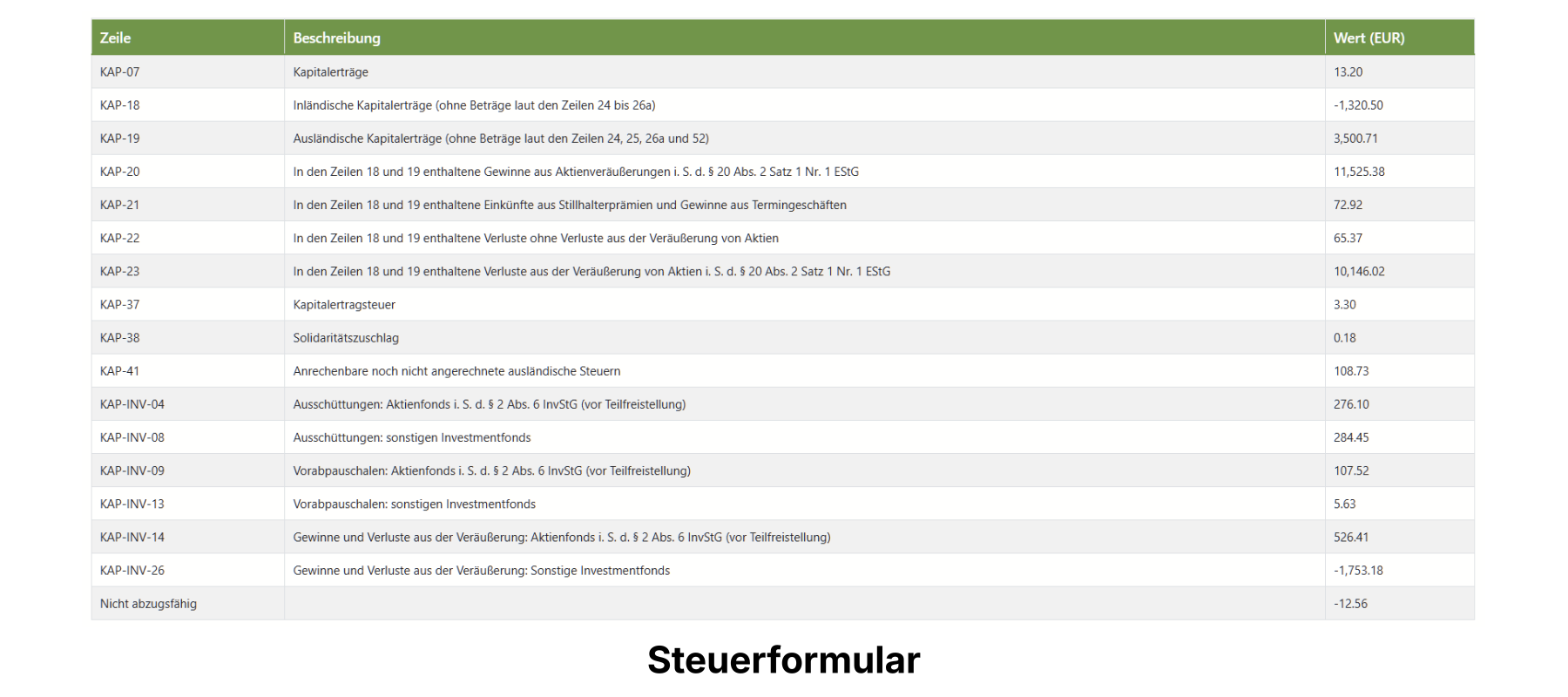
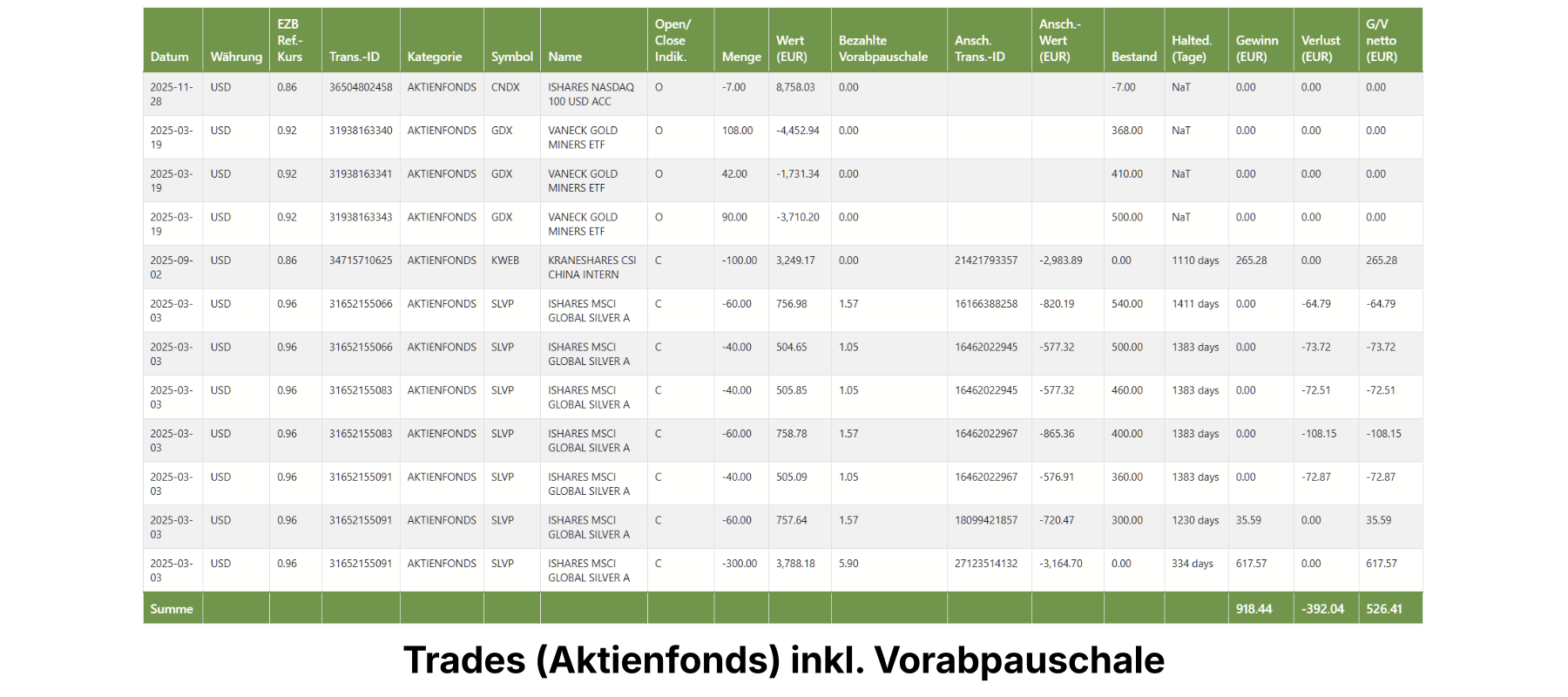
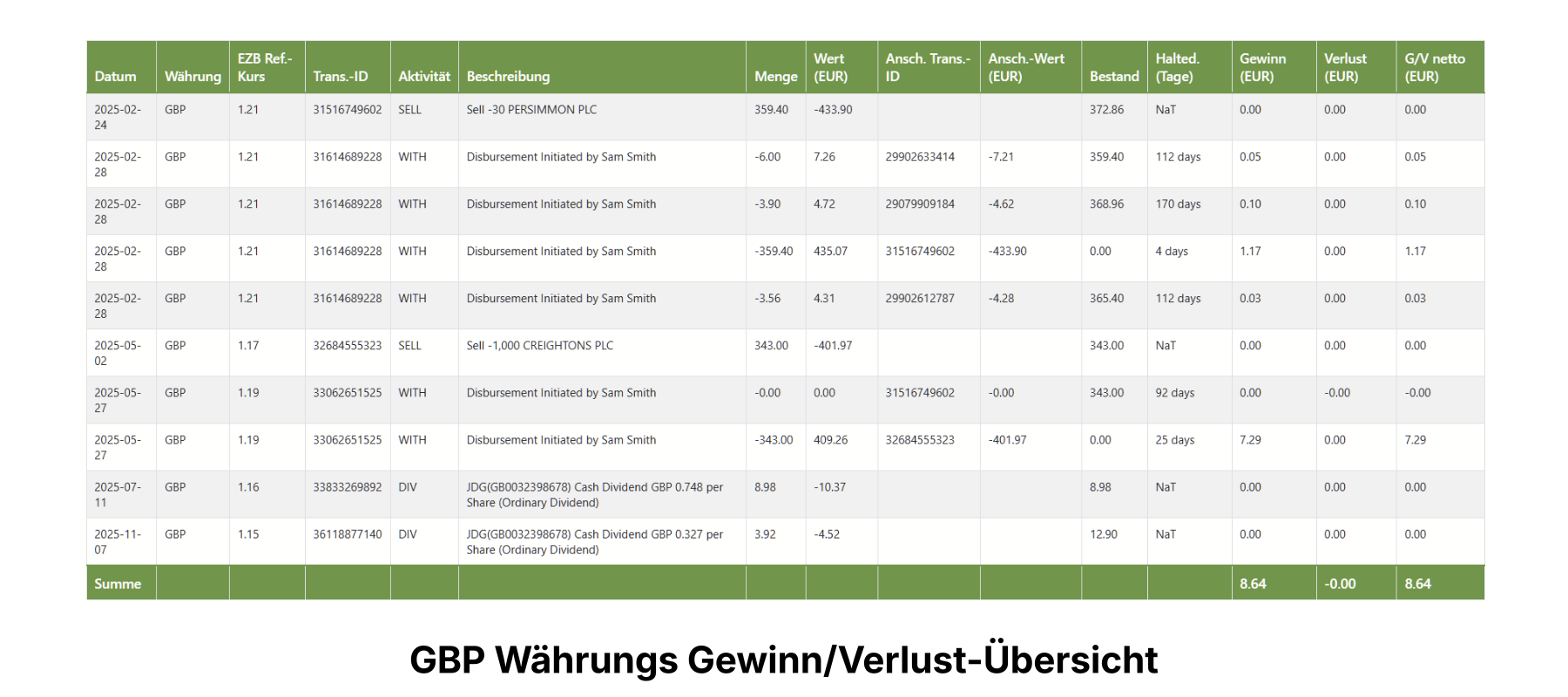
More details on Interactive Brokers tax returns in Germany as well as advance lump sum, options and creditable foreign withholding tax can be found on our detail pages.
Instruments
Supported Financial Instruments
KapitalTax processes all common instruments at Interactive Brokers.
Stocks
Individual stocks from around the world
ETFs
Incl. advance lump sum
ETCs & ETNs
Commodities & structured products
Options
Puts & Calls
CFDs
Contracts for Difference
Benefits
Why KapitalTax?
4 good reasons for processing your transaction data with KapitalTax.
Save Time
No more hours of manual calculations. Your report is ready in minutes.
Germany Focus
Specifically designed for German taxes. FIFO, DTA crediting, advance lump sum – all included.
Clear & Verifiable
Structured tables with traceable calculations as input for your tax return.
Online, Simple & Secure
SSL-encrypted transmission, processing, report. Done.
Target audience
Who is KapitalTax for?
KapitalTax is aimed at private investors in Germany who have an account with Interactive Brokers or trade through affiliates/ resellers like Lynx or CapTrader and want to prepare their transactions for their tax return in a structured way.
Security
Security & Privacy
Your data is safe with us.
SSL Encryption
All data is transmitted encrypted.
No Broker Credentials Needed
Only Flex export (XML).
GDPR Compliant
Processing according to European data protection standards.
Only Email Required
No name, no address.
FAQ
Frequently Asked Questions
Answers to the most important questions about KapitalTax.
KapitalTax is currently 100% free because we built the tool out of our own practical need and want to keep improving it together with real users.
There are no hidden costs, no payment details and no subscription. Your data will not be sold. Should paid additional features be introduced later, we will communicate this transparently in advance.
We currently finance KapitalTax privately. We built the tool out of self-interest and are in the product and feedback phase: with real users we want to improve KapitalTax and reliably cover further edge cases.
There are no hidden fees and no data sales. Should paid additional features be introduced later, we will communicate this transparently in advance.
Find more questions and answers in the FAQ section.
End the Tax Excel Marathon
Upload your IB Flex XML – and get the tables you actually need in minutes.
Create Free ReportNo broker credentials • Just Flex XML • Free • GDPR compliant